Cookie compliance for Statamic.
Connect Statamic CMS projects with zero-config consent tags for Antlers & Blade, plus deep control panel settings.
QookieQloud for Statamic
Why choose QookieQloud for Statamic.
Designed specifically for modern digital agencies, developers, and store owners on Statamic.
Automated Script Blocking
QookieQloud automatically detects third-party tags on Statamic and prevents them from firing until the visitor has granted consent.
Google Consent Mode v2
Full native support for Google Consent Mode v2 without any coding required. Keep your Google Analytics & Ads models accurate.
Continuous Radar Scanning
When you add new scripts or update your Statamic theme, our scheduled audit scanner automatically discovers new cookies and flags changes.
Install QookieQloud for Statamic in 3 steps.
Add your domain on QookieQloud, install the Composer addon, and verify directly in the Control Panel.

Register domain on QookieQloud
Create your account on app.qookieqloud.com and register your site domain in the dashboard first.
Open app.qookieqloud.comAdd the Composer package
Require the official QookieQloud Statamic addon in your Laravel & Statamic project root.
composer require qodli/qookie-statamic
Publish Config & Auto-Verify
Run publish command. The addon connects directly to QookieQloud API and automatically verifies your domain — zero domain keys needed.
php please vendor:publish --tag=qookie-statamic
Full consent telemetry directly in Statamic Control Panel.
Crafted to match the Statamic Control Panel dark theme. View live consent metrics, manage script injection, and verify domains without touching code.
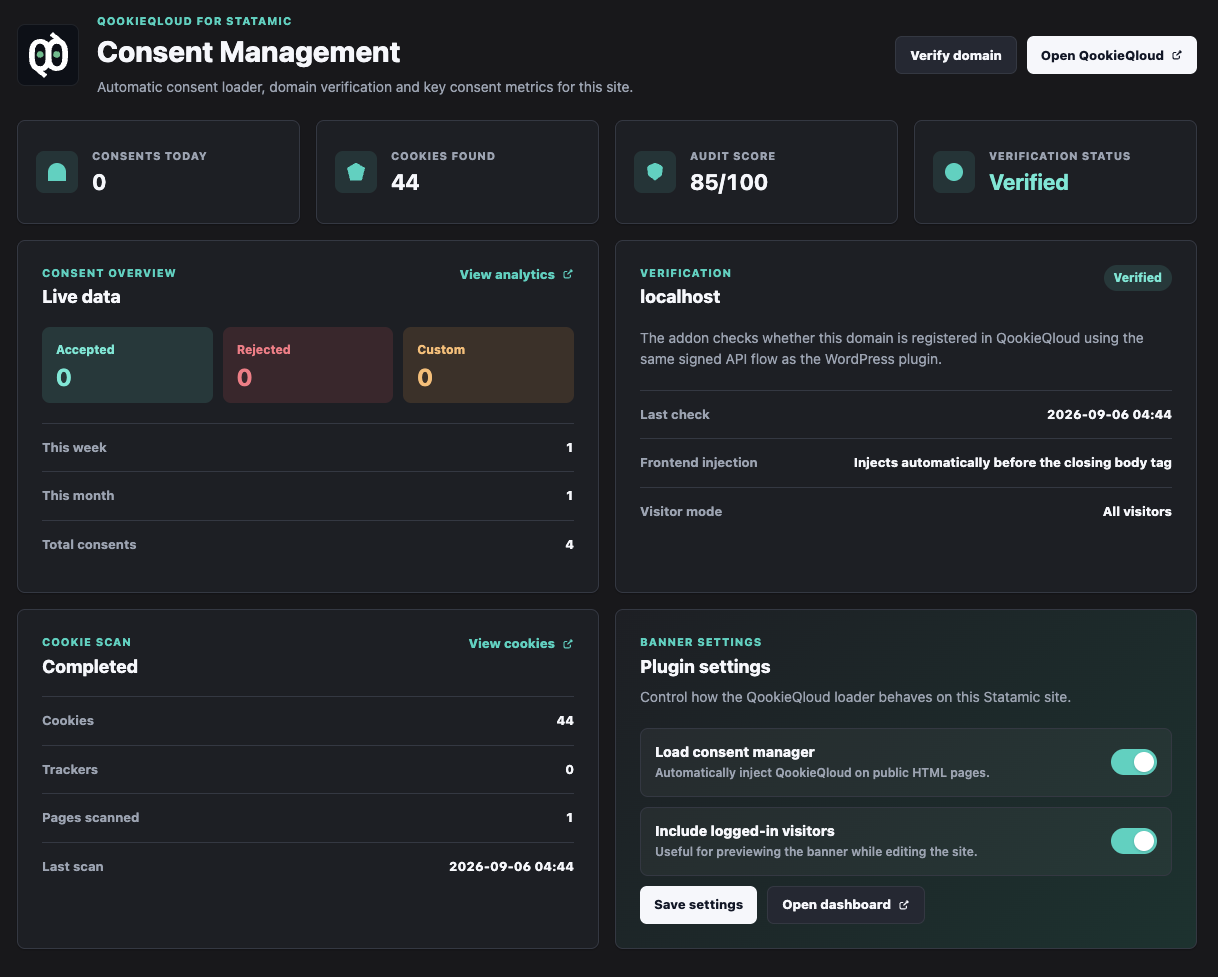
Statamic CP Dark Mode
Pixel-perfect integration matching Statamic’s native control panel UI components.
Automatic Domain Handshake
Signed API verification checks local and production domains automatically without domain keys.
Cookie & Tracker Telemetry
Real-time telemetry for active cookies, third-party trackers, and scanned templates.
Frontend Injection Toggles
Control auto-injection and logged-in visitor preview modes with simple toggles.
The official QookieQloud™ addon for Statamic empowers Laravel and Statamic developers with clean template tags for Antlers and Blade, automatic asset injection, and deep Control Panel management.
Highlights:
- Zero-Config Antlers & Blade Tags: Inject consent banners with a single tag or customize conditional triggers in your templates.
- Control Panel Dashboard: View consent statistics and radar scan health directly inside your Statamic CP.
- Tailored for High Performance: Zero runtime database overhead, completely flat-file and caching friendly.
- Custom Event Hooks: Dispatch custom JavaScript and PHP events when visitor consent changes.
Frequently Asked Questions about Frontend Injection Toggles.
Got questions about integrating QookieQloud with Frontend Injection Toggles? Here are quick answers.
How does local development (Herd, Valet, Docker) work?
The addon automatically detects local and development environments (APP_ENV=local, localhost, .test, .ddev.site). You can test consent dialogs, banner styling, and event hooks locally without consuming your radar scan quota or polluting production compliance logs.
Do I have to insert code manually into my layout templates?
By default, the addon automatically injects the required script into your <head> via Laravel middleware, requiring zero template edits. If your theme requires custom script placement or bundling, you can turn off auto-injection in the Statamic Control Panel and use the {{ qookieqloud }} Antlers tag (or @qookieqloud in Blade) anywhere in your layout.
Can I hide the consent banner for logged-in editors and Live Preview?
Yes. Under the addon settings in the Statamic Control Panel, you can toggle "Bypass for authenticated users". This prevents the consent banner from popping up while you or your content editors are logged in, editing entries, or reviewing content in Statamic Live Preview.
How do I block tracking scripts in Antlers and Blade before consent?
QookieQloud automatically blocks scripts matching your radar scan rules client-side. For explicit template control, change your script tag to type="text/plain" with data-qq-category="marketing" (or "analytics"). QookieQloud will execute the script automatically the moment the visitor grants consent.
Does QookieQloud support Statamic Static Site Generation (SSG)?
Yes. Because consent evaluation and script unblocking execute asynchronously client-side via edge CDN, static HTML files generated via php please ssg:generate (hosted on Netlify, Cloudflare Pages, Vercel, or AWS S3) work seamlessly without server runtime dependencies.
How does the addon handle Statamic Multi-Site and multilingual domains?
In multi-site installations, the addon automatically resolves the active Statamic site locale and renders the banner and preference center in the visitor's language. If your sites operate on separate country top-level domains (e.g. .se vs .com), you can assign individual compliance presets per site.
Explore other QookieQloud integrations
Connect QookieQloud across all your web projects
Ready to make your Frontend Injection Toggles site fully compliant?
Run a free instant radar scan today and see what third-party cookies your visitors receive before consent.